
Technical knowledge
This site is a brand-new Moodle created exclusively for this technical evaluation.
Below is an overview of the performance and security settings for this Moodle instance. Our team has a collective 40+ years of Moodle experience and we hope this is evidenced by the comprehensive Moodle install and setup.
Moodle HQ will be provided an admin account, with login credentials being included in our Moodle Certified Partner application.
1. Moodle Performance
The provided Moodle site needs to be hosted in a cloud infrastructure. As a minimum requirement, this site needs to be able to support at least 500 concurrent users and needs to follow the minimum Performance Recommendations and Security Recommendations.
i) Obtain a baseline ✅
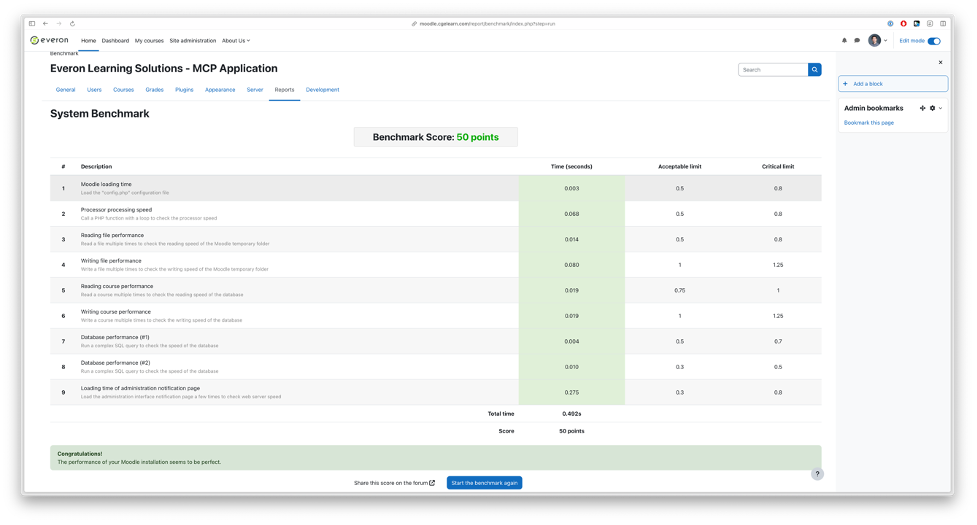
Generally, we score well. There are a few instances where we ran the baseline and scored less than optimally for "Loading time of administrative notification page". Below is a screenshot of a baseline test:
ii) Scalability ✅
As this is a smaller installation, the web application and database are on the same Aliyun cloud-based server.
All of Everon's medium to large sized production sites for clients are deployed on Aliyun (within China) or AWS (outside China) servers with the database and storage (i.e., moodledata folder) on separate storage services. These are complemented with the use of a load-balancer and CDN (where required).
All hardware (i.e., CPU, RAM, storage, and bandwidth) are scalable.
iii) Hardware configuration ✅
This instance is hosted on an Aliyun ECS ecs.g6.xlarge. The specs are: 4vCPU, 16GB, system disk 40GB, data disk 2TB, and bandwidth by-traffic (max 100Mbps).
iv) Operating system ✅
The operating system for this instance is CentOS Linux 7.
v) Caching performance ✅
The cache settings have been left as default as this instance has been set up for only 500 users. If the number of users grew substantially, then we would consider a separate server for caching.
vi) Web Server performance ✅
The Apache and X-Sendfile settings have been optimized as suggested in Performance Recommendations page in Moodle Docs.
vii) Cron performance ✅
Cron is set up to run every minute.
viii) Database performance ✅
This instance is configured with MariaDB.
2. Moodle Security
The provided Moodle site needs to be hosted in a cloud infrastructure. As a minimum requirement, this site needs to be able to support at least 500 concurrent users and needs to follow the minimum Performance Recommendations and Security Recommendations.
i) Update Moodle regularly on each release ✅
Our typical client is a K-12 school and, as such, we schedule major release type updates (e.g., 4.x) during school holidays (e.g., Christmas, Chinese New Year, May break, and summer holiday). Minor release types (e.g., 4.x.y) are updated during weekends as required.
ii) Use https to secure all pages ✅
Yes. https is enabled for the entire site (not just the login page).
iii) Register globals are disabled ✅
Yes. Register globals are disabled.
iv) Run the security overview report ✅
Click the button below to view the security overview report.
v) Use strong passwords ✅
Yes. Passwords are set to a length of 8 alphanumeric digits and require at least 1 digit, 1 lowercase letter, 1 uppercase lletter and 1 non-alphanumeric character.
vii) Only provide teacher accounts to trusted users ✅
Yes. Teacher accounts are confirmed with partner schools prior to account creation.
viii) No public sandboxes with free teacher accounts on production servers ✅
Yes. We do not provide public sandboxes with free teacher accounts on production servers.
ix) Separate our systems as much as possible ✅
Yes. We use a dedicated cloud-based server for each instance.